
Getting your eTA approval notification is genuinely good news — it means Canada’s immigration authority, IRCC (Immigration, Refugees and Citizenship Canada), has reviewed your application and issued an electronic Travel Authorization tied directly to your passport. The hard part is over, but there are a few practical things worth confirming before you pack your bags.
This article walks you through exactly what that approval message means, how to verify everything is set up correctly, and what to do if something looks off. Think of it as your quick pre-flight sanity check — the kind a well-travelled friend would walk you through over coffee.
The steps below are short and concrete. Most travellers can run through them in under ten minutes, well before check-in day arrives.
What an eTA approval notification actually tells you
An eTA approval means the authorization has been issued and stored electronically — linked to the specific passport number you used in your application. There is no physical card or sticker; the record lives in a database that airlines and border officers can access automatically (IRCC).
The email you receive typically confirms your application was approved and reminds you to travel with the passport that matches your application. It won’t grant entry on its own — a border services officer still makes the final admission decision when you arrive — but it is a required step before you can board a flight to Canada (CBSA).
If the email says anything other than “approved,” such as “pending” or “not approved,” the guidance below on checking your status and reapplying will be more useful to you than the checklist sections.
What to do immediately after approval
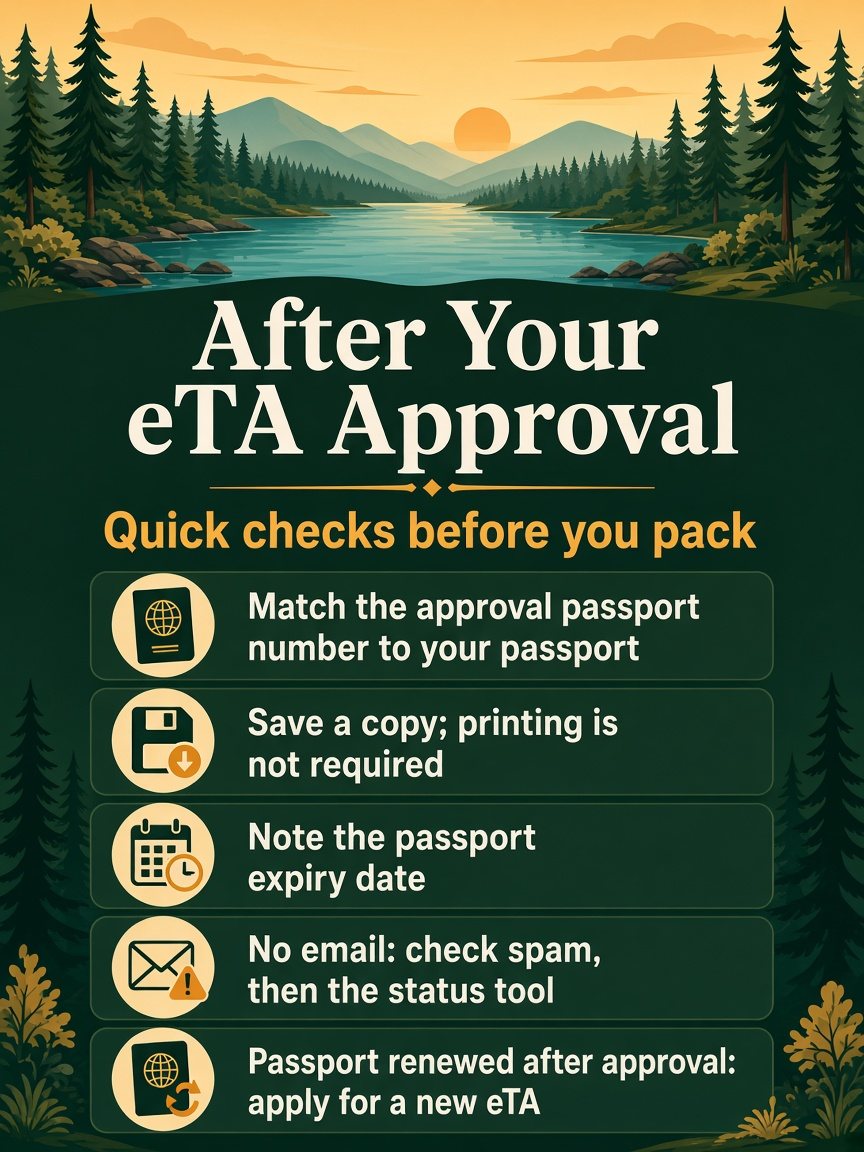
The first thing to do is cross-reference the passport number shown in your approval message against the physical passport you plan to travel with. They must match exactly — even a single transposed digit creates a mismatch that can cause boarding problems. If your passport has changed since you applied, what happens when passport details change explains the fix.
Next, save a copy of the approval. A screenshot saved to your phone’s downloads folder, or a PDF emailed to yourself, gives you quick access if an airline agent asks for confirmation at check-in. IRCC notes that printing is not required since the eTA is verified electronically, but having it accessible takes thirty seconds and removes any uncertainty.
Finally, note the passport expiry date. An eTA is valid for up to five years or until your passport expires, whichever comes first (IRCC). If your passport expires before your planned trip, you’ll need to renew the passport and then apply for a new eTA.
How to confirm your eTA is linked to the right passport
Follow these three steps to make sure everything lines up before your travel date:
-
Locate your approval message. Search your inbox (and spam folder) for emails from IRCC or the service you used to apply. The message will include your application number and the passport number on file.
-
Compare the passport number. Open your passport to the photo page and read the number character by character against what’s shown in your approval. If they match, you’re set.
-
Reapply if the numbers differ. A mismatch means the eTA is linked to a different passport — possibly an old one. You’ll need to check your eTA status first to confirm what’s on file, then submit a fresh application with your current passport details if needed.
One common scenario: you renewed your passport after applying for the eTA. In that case, the old eTA is no longer usable — it’s tied to the expired document. A new application using the renewed passport number is the only fix (IRCC).
If no approval email arrived
Start with the spam folder — IRCC notification emails occasionally end up there. Also check the email address you entered on the application; if you mistyped it, the message went nowhere.
If the inbox search comes up empty, use the official IRCC status-check tool to look up your application by passport number. This will show whether an eTA was issued, is still processing, or was not found.
No result after checking? The safest next step is to submit a new application rather than wait indefinitely, particularly if your travel date is approaching. Avoid booking non-refundable flights until you have a confirmed approval in hand.
For more context, see the guide to the Canada eTA approval email and status notices.
At the airport: what airlines and border officers check
Here’s a simple breakdown of what happens at each stage:
- Airline check-in: The agent scans your passport. Their system queries the eTA database and either clears you to board or flags a mismatch. This is the most common point where a passport-linking problem surfaces.
- At the boarding gate: Some carriers run a second passport scan. Again, the eTA is verified electronically — no printed document required, though having the approval email accessible on your phone is a reasonable precaution.
- At CBSA arrival: An officer reviews your passport and may ask about the purpose and length of your visit. The eTA is already visible on their system; you don’t need to present a separate document for it.
One thing to keep in mind: the eTA applies to air travel only. If you’re crossing into Canada by land or ferry, a different entry requirement applies — the eTA won’t be checked for those routes (IRCC/CBSA).
Common issues and quick fixes
- Passport renewed after approval → Apply for a new eTA using the new passport number before travelling.
- Typo in passport number on the application → The existing eTA is invalid for your travel document; reapply with the correct number.
- No approval email received → Check spam, then use the IRCC status tool; if still unresolved, submit a new application.
- Approval shows “pending” close to travel date → Most applications process quickly, but IRCC does not guarantee a specific turnaround time; apply as early as possible before your departure.
Pre-flight checklist (confirm before you leave home)
- ✓ Passport number matches the one on your eTA approval
- ✓ Passport is valid for the duration of your trip
- ✓ Approval screenshot or PDF saved on your phone
- ✓ Return or onward ticket accessible (border officers may ask)
- ✓ Travel insurance details and emergency contact numbers easy to find
FAQ
Do I have to print my eTA approval to board the flight? Printing is not required. The eTA is electronic and linked to your passport, so airlines verify it by scanning your travel document. Keeping a digital copy on your phone is purely a convenience — useful if you want quick access to your application number, but not a boarding requirement (IRCC).
What if I got a new passport since my eTA was approved? The existing eTA stays tied to the old passport and won’t work with the new one. You need to apply again using the new passport number. The process is the same as your original application.
How long is an eTA valid once issued? Up to five years from the date of issue, or until your passport expires — whichever date comes first (IRCC). A single eTA allows multiple trips to Canada within that window, as long as each visit meets the standard entry conditions.
Can I check whether my eTA is still active before I travel? Yes. The IRCC status tool lets you look up your authorization using your passport number and date of birth. It’s worth running this check a few weeks before any trip, especially if the eTA was issued more than a year ago or you’ve renewed your passport since.
Does an eTA guarantee I’ll be allowed into Canada? An approved eTA confirms you’ve cleared the pre-screening step and can board a Canada-bound flight. The final admission decision rests with the Canada Border Services Agency officer at the port of entry, who may ask questions about your visit before clearing you through (CBSA).
Before You Fly
An eTA approval is a solid green light to start packing — provided the passport in your hand matches the one on the application. Run through the checklist above, save a copy of the approval somewhere easy to find, and you’re well prepared for a smooth check-in experience.
If your passport has changed, an error crept into the application, or you simply can’t locate the approval, the practical move is to submit an application with your current, correct passport details before your departure date.